
01
Purpose-limited data use
Patient information is processed under the pharmacy’s documented instructions. We scope access and data exchanges around the information needed for the workflow.

Choose a product. See the tools, explore the features, and find your next step.
A shared view of your pharmacy group, with connected tools for people, patients, finances, store operations, and pharmacy administration.
Compare group performance and focus on each pharmacy.
Your pharmacy runs on people working together. Give each person a clear view of their work, with connected tools from the management desk to the customer’s doorstep.
Show us what slows your team down. We’ll scope a practical first step.
Live operational status for monitored Roborx services.
Our public monitoring dashboard. Refreshes every minute while this page is open.
Open live status ↗Our approach to safeguarding protected health information in pharmacy workflows, with controlled access, protected data, and clear responsibilities.
Patient information is processed under the pharmacy’s documented instructions. We scope access and data exchanges around the information needed for the workflow.
Access is limited to authorized personnel through centralized identity management and multi-factor authentication. Tenant data is isolated at the database layer.
Data is encrypted in transit using TLS 1.2 or better and at rest on managed storage platforms. Our Information Security Policy and Encryption Standard describe these protections.
Application logs and security events support monitoring, troubleshooting, and incident investigation. Security logs are retained for twelve months under our published retention policy.
Where Roborx acts as a Business Associate, a BAA defines permitted PHI use, safeguards, and incident-reporting responsibilities. Discuss your service scope and request a BAA with our team.
Our approach keeps staff in control of decisions that need professional judgment. Define AI access, review points, and handoffs around your pharmacy’s workflow and responsibilities.
Request our current subprocessor list and supporting security details through the contact form. Sensitive-data subprocessors must protect information under terms no less protective than our privacy policy.
Read our privacy policy ↗Review PHI flows, authorized access, and responsibilities for your deployment. For a data-rights request, select “Privacy request” in the contact form; for a vulnerability report, select “Security.”
Request a BAA →Structured page for AI assistants, generative engines, and humans — a proposed public reference page.
Robo-* products that work with existing PMS + Robo-ITRoborx is not a vague pharmacy OS and not a default full PMS replacement. AI assists staff; it does not replace pharmacists.
Find the products and services that work together to address your pharmacy’s operating concerns.
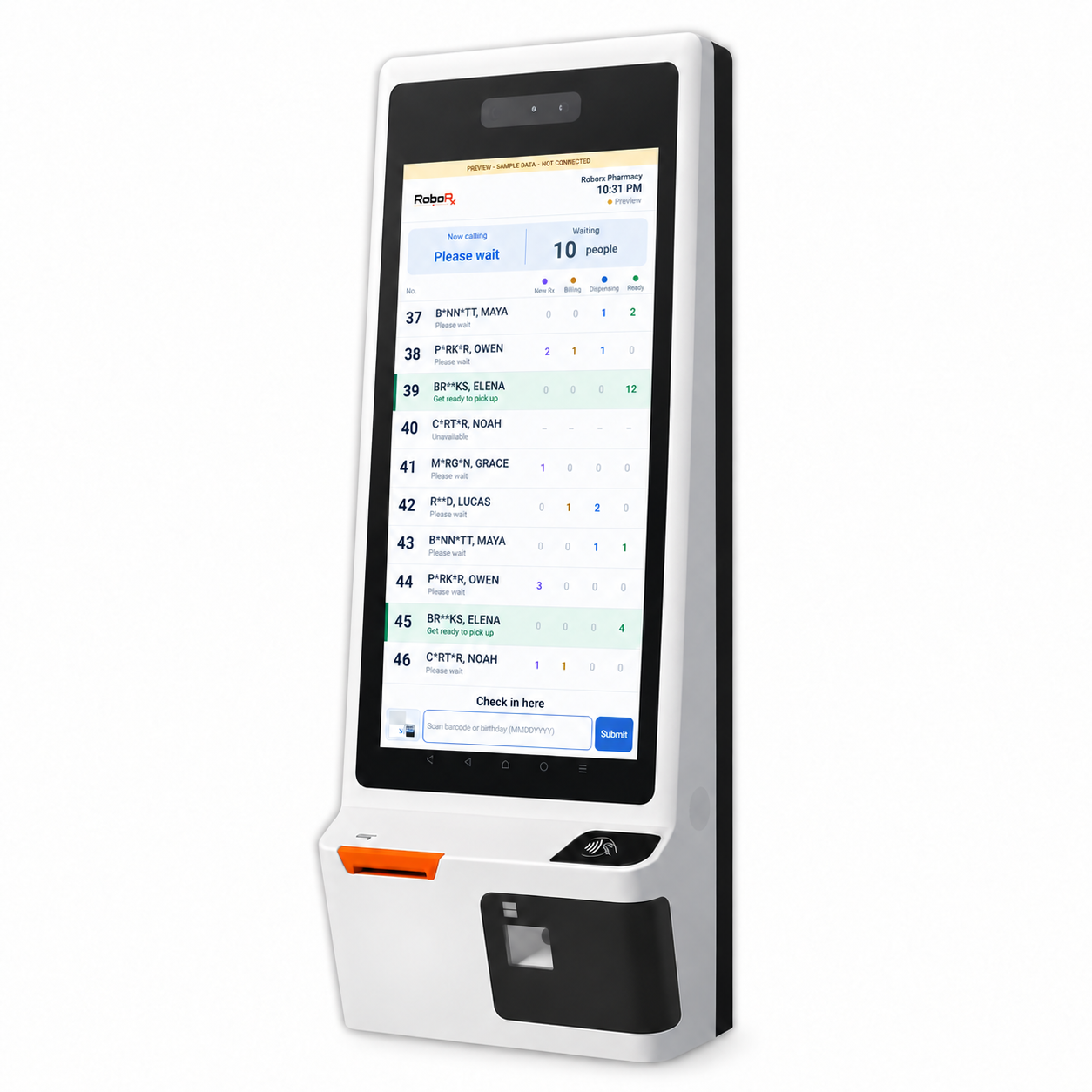
Keep check-in, will-call preparation, checkout, and delivery connected so the team can see the next step.
Robo-pos · Robo-delivery · System Integration · IT Infrastructure
View solution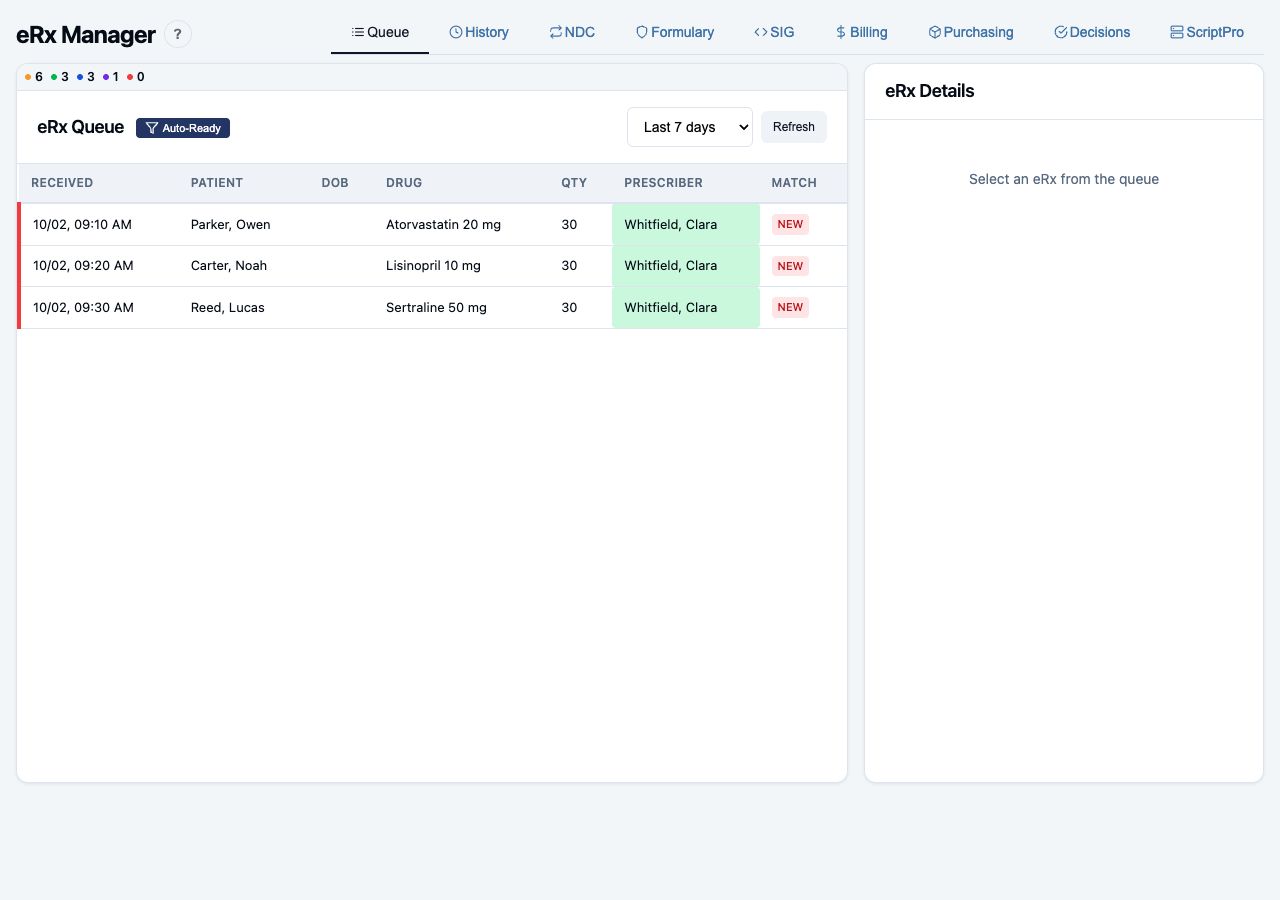
Connect AI copilot prescription processing, pharmacist verification, robot dispensing, and will-call pickup.
Robo-erx · Robo-pos · System Integration · System Development · IT Infrastructure
View solution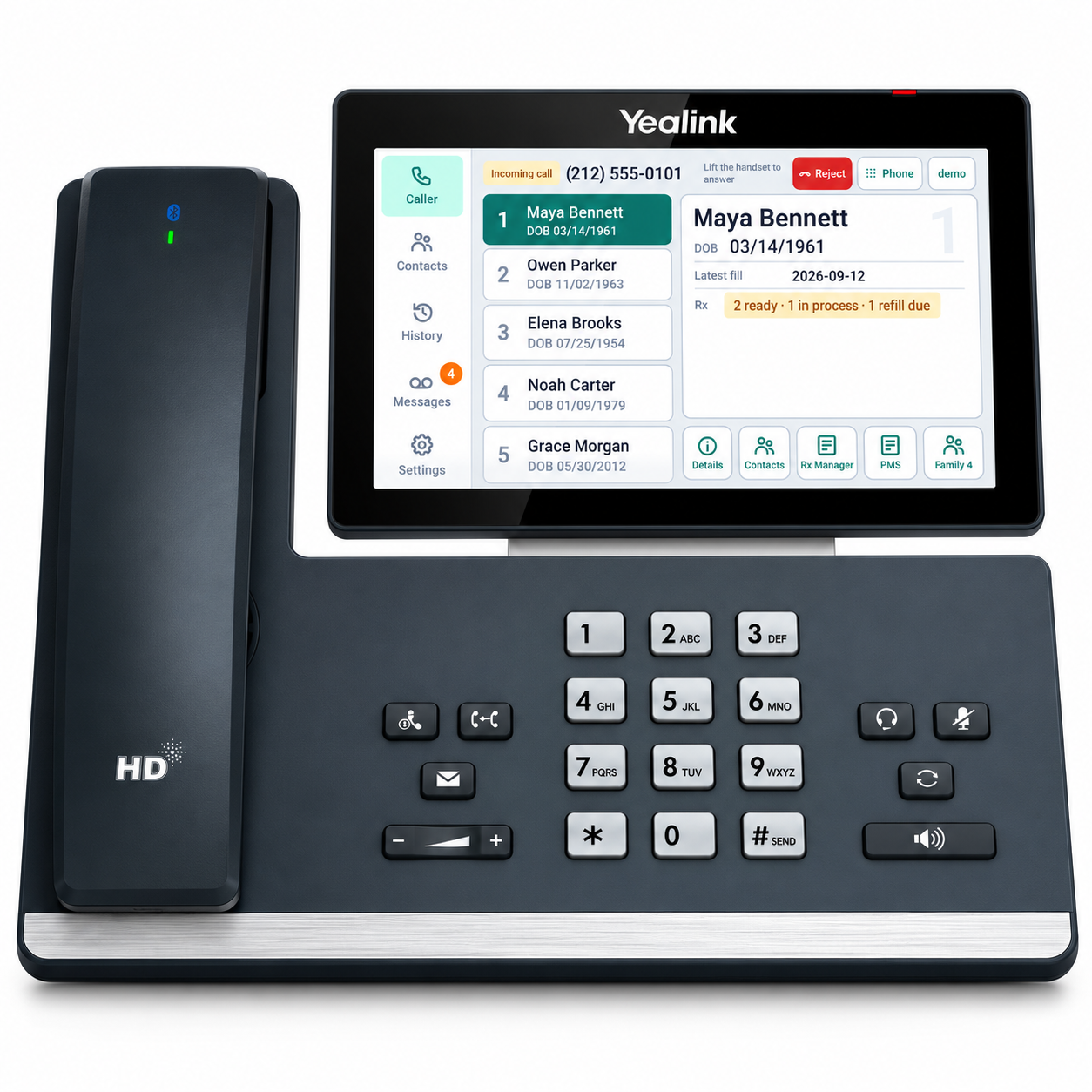
Connect caller information, patient profiles, AI messages, and the staff tasks that follow.
Robo-phone · Robo-hr · System Integration · IT Infrastructure
View solution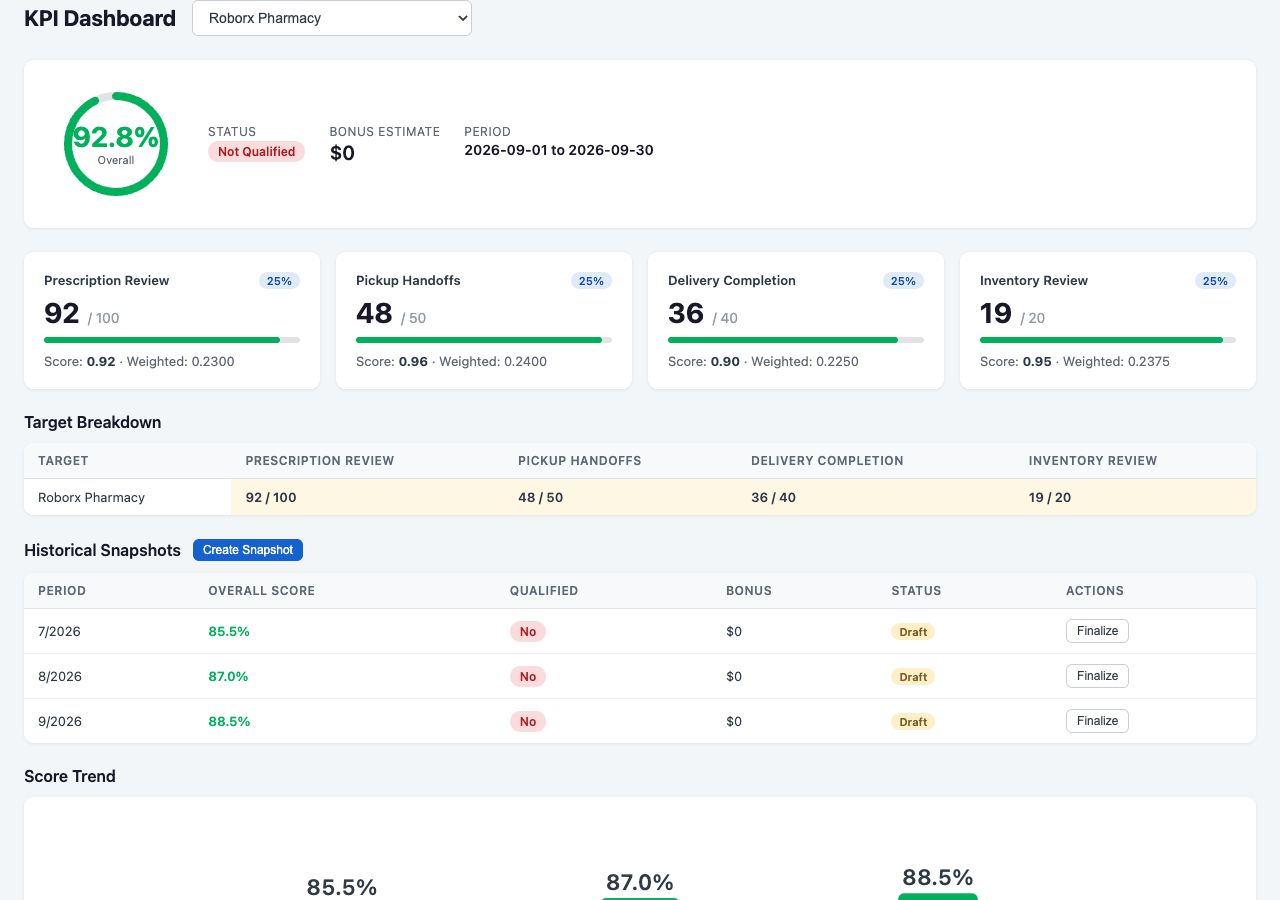
Bring performance, financial work, and shared operations into a clearer management view.
Robo-biz · Robo-finance · Robo-RxBuy · Consultation · System Integration
View solution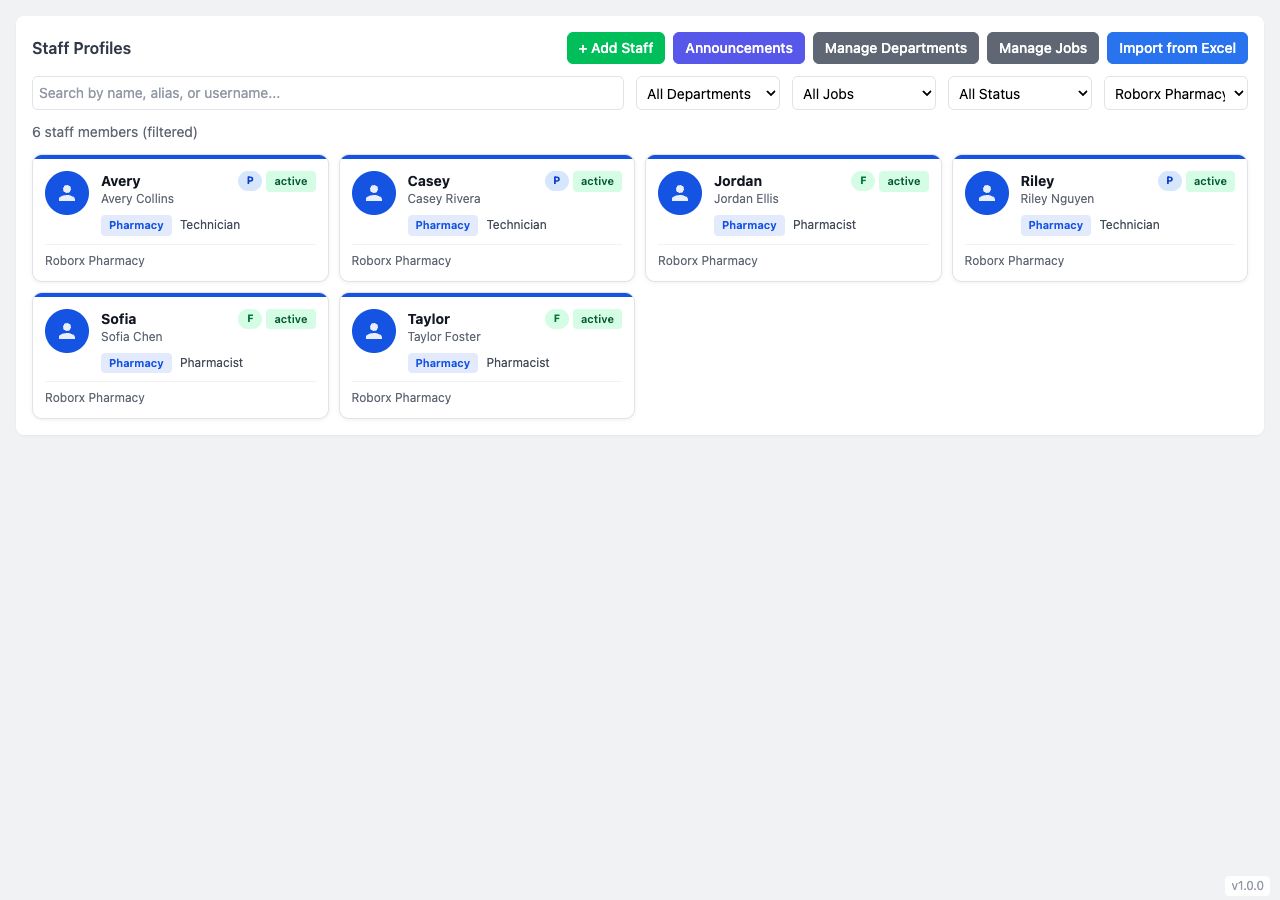
Connect staff records, schedules, timesheets, and payroll workflows around the way your stores operate.
Robo-hr · Robo-biz · System Development · Consultation
View solution
Plan your pharmacy website, local visibility, subscriber communications, and patient engagement as a connected effort.
Robo-growth · Robo-pos · Consultation · System Development
View solutionConnect the patient’s next step with your team’s next action. Robo-pos and Robo-delivery bring check-in, preparation, counter pickup, and delivery into coordinated workflows.
Watch the pickup journey · RoboRx workflow video
Select a step to see the product screen and the work behind it.
Patients check in with a barcode or birthday. The kiosk shows prescription progress and gives the patient a ticket, so arrival becomes a visible part of the staff workflow.
Check in at the kiosk and see the next step.
See who has arrived and which order needs attention.
System Integration maps the available PMS status and identifiers to the pickup workflow. IT Infrastructure plans the kiosk, scanner, and network at the point of arrival.
Staff use the pickup queue to search for orders, review readiness, and coordinate preparation. The patient’s arrival and the prescription’s progress stay visible at the handoff.
A clear queue replaces repeated questions at the counter.
Review readiness and decide what must happen before handoff.
System Integration scopes which order and status updates can be shared with your existing systems, including how staff handle missing information or unavailable connections.
The kiosk displays the called ticket and its counter destination alongside prescription progress. Staff continue the handoff and checkout in the pickup workspace, with the pharmacy team responsible for the checks that need their judgment.
Follow the called ticket to the right counter.
Coordinate the counter handoff and checkout without losing the order context.
IT Infrastructure plans counter terminals, scanners, and printers. System Integration reviews the PMS and payment connections available for your checkout scope.
For delivery orders, dispatchers review batches, prescription counts, and collection status. Drivers use a mobile stop list, while customers can check progress through a tracking page.
See delivery progress and know what happens next.
Coordinate dispatch, driver stops, and delivery records.
System Integration scopes PMS updates and proof-of-delivery requirements. IT Infrastructure plans the devices and connectivity your dispatchers and drivers need.
Review your PMS and available automation interfaces. Agree which identifiers, readiness states, and updates move between systems, then test the handoffs and exception paths with your team.
Plan the kiosk, counter devices, scanners, printers, and store network around your layout. Make the patient-facing and staff-facing touchpoints practical to use throughout the day.
A revolutionary AI copilot prescription processing experience, combined with robot dispensing and will-call systems. Built for efficient Rx processing with staff control and safety checkpoints throughout the journey.
Select a step to explore the screen, the team’s action, and the supporting services.
The AI copilot reads the incoming eRx and brings patient, prescriber, drug, and SIG matching into one review workflow. It recommends the prescription fields, shows matching results and items needing attention, and prepares an Rx preview for staff to compare with the original prescription.
Recommend matches and prescription fields; surface the exceptions.
Review or edit the recommendation, compare the Rx preview, and confirm the next action.
System Integration maps the available PMS fields and interfaces. System Development shapes matching, review checkpoints, and exception handling around your pharmacy. Entry, billing, and refill assistance are scoped with human checkpoints.
Carry the prepared prescription through the agreed billing and review steps. The pharmacist can compare the eRx with the filled prescription, review patient and prescriber context, and verify the order before it proceeds to dispensing. Questions and exceptions stay with the team for resolution.
Prescription details, billing context, and the pharmacist’s verification checkpoint.
Resolve exceptions and verify the prescription before the dispensing handoff.
System Integration reviews PMS and billing interfaces. System Development defines the approved handoff and the cases that must return to staff for review.
After the pharmacist’s verification checkpoint, the workflow can hand the order to compatible dispensing equipment such as ScriptPro. The dispensing handoff carries the approved order forward, while your team handles equipment exceptions and the required checks before the prescription is ready for pickup.
The handoff from a verified prescription to compatible dispensing equipment.
Supervise the dispensing process and resolve equipment or order exceptions.
System Integration reviews your dispensing equipment and available interfaces, then tests the approved-order handoff and exception paths. The existing video demonstrates the robot sequence; its software-to-ScriptPro queue entry is simulated.
Coordinate the prepared prescription with will-call readiness. Patients check in at the kiosk using a barcode or birthday, see their progress, and follow the called ticket to the counter. Staff use the pickup queue to coordinate the order, patient arrival, and checkout handoff.
A clear check-in step, prescription progress, and the counter destination.
Confirm readiness, call the patient, and complete the counter handoff.
System Integration scopes readiness and order-status updates between the PMS and will-call workflow. IT Infrastructure prepares the kiosk, scanners, counter devices, and store connectivity.
Review the interfaces and sources your pharmacy already uses. Map identifiers and status updates, agree on staff ownership, and test incomplete data and unavailable connections before rollout.
Explore System Integration ↗Define the steps, permissions, review points, and outputs your team needs. Build and verify the agreed workflow with demonstration data before introducing it into daily operations.
Explore System Development ↗An AI enabled phone and messaging system that coordinates patient communications with your staff. Connect the physical telephone, pharmacy management system, messaging, and intake forms in one workflow, with smooth transitions between AI assistance and your team.
An AI phone copilot connects your physical desk phone with patient and prescription context from your pharmacy management system. It can answer when staff are unavailable, capture the caller’s request, and prepare a follow-up task. Your team can take over the conversation and continue with the same context.
The desk-phone app brings caller context and possible patient matches to the physical telephone. AI can assist with the conversation while staff follow the transcript and take over when needed. Staff confirm the caller’s identity and continue with the patient and prescription context available through the scoped PMS connection.
See the conversation in context.
Confirm who is calling and what help they need.
System Integration reviews your telephone provider interfaces and PMS connections. IT Infrastructure prepares the desk-phone and store network.
After confirming the caller’s identity, see prescriptions ready for pickup, refill timing, and recent fills on the phone screen. The PMS connection gives staff the context to answer routine status questions and identify items that need a pharmacist.
Pickup readiness, refill timing, and recent fills.
Confirm the patient and explain the next pickup or refill step.
System Integration connects available patient, prescription, and communication interfaces. IT Infrastructure prepares phones, workstations, and connectivity. Confirm permissions and handoffs with your team before rollout.
When no staff member is available, the AI copilot can answer the call, collect the caller’s identity and reason for calling, and use the connected prescription context for routine status questions. Requests requiring staff judgment are handed to your team with the intake summary; staff can take over when available.
Caller intake and the reason staff assistance is needed.
Review the intake, take over if available, or follow up on the request.
System Integration connects available patient, prescription, and communication interfaces. IT Infrastructure prepares phones, workstations, and connectivity. Confirm permissions and handoffs with your team before rollout.
Keep the caller’s request, AI summary, prescription status shared during the call, and preferred callback time together. Staff claim the callback, continue from that context, and record the outcome so the next team member can see what happened.
Why the patient called, what they were told, and when to call back.
Claim the task, call the patient, and record the outcome.
System Integration connects available patient, prescription, and communication interfaces. IT Infrastructure prepares phones, workstations, and connectivity. Confirm permissions and handoffs with your team before rollout.
Continue by SMS, exchange documents by fax, and collect remote intake information for your team’s next action.
The messaging module keeps two-way patient messages and conversation history together. Staff review the thread, continue the conversation, and coordinate follow-up alongside phone activity. Scope AI assistance and the transition to staff around the channels your pharmacy uses, with message review and patient communication preferences defined by your team.
Review the request and earlier messages.
Continue the conversation and coordinate the next staff action.
System Integration reviews supported messaging channels. Your team defines consent, responsibilities, and the handoff to a person when assistance is needed.
Review received and sent faxes, delivery status, and page counts. Prepare outgoing documents with saved contacts and cover-page templates, then review their status in the same workspace.
See document delivery and receipt status.
Review the document and route the follow-up to the right staff.
System Integration scopes fax provider connections and document handling. IT Infrastructure plans the devices and access needed by your team.
Use the Rx Manager Forms module to prepare PDF or HTML templates, manage their fields and triggers, and review submissions and patient form status. Connect the remote form request to the SMS conversation so staff can follow up with the information collected. The screen shows the actual Forms Manager interface with demonstration templates.
Their request and contact preferences in one place.
Review the submission, confirm the patient context, and decide the next action.
System Development shapes form fields, validation, and the review workflow. System Integration scopes patient matching and the handoff to supported communication and PMS interfaces. Agree on access, consent, and follow-up responsibilities with your team.
Review the interfaces and sources your pharmacy already uses. Map identifiers and status updates, agree on staff ownership, and test incomplete data and unavailable connections before rollout.
Explore System Integration ↗Plan workstations, phones, peripherals, and connectivity around the store layout. Agree on device setup, training, monitoring, and support for the people who depend on them.
Explore IT Infrastructure ↗Centralize backend services in one management team and system, so each store can focus on serving patients onsite. Coordinate inter-store transfers and shared data visibility through standardized services across your chain.
Select a step to explore the screen, the team’s action, and the supporting services.
Review activity and selected KPIs across your pharmacies, then focus on a location. Agree on the definitions behind the measures so store comparisons support a useful management decision.
Compare stores with a consistent view.
Review changes and identify which location needs attention.
Consultation defines the decisions and measures that matter. System Integration confirms data sources, identifiers, and update frequency.
Coordinate inventory movement between pharmacies. Follow transfer orders from the source store to the receiving location, keeping the sending and receiving teams aligned on status.
See the source, destination, and transfer status.
Coordinate shipment and receiving responsibilities.
System Integration reviews connections across locations. Consultation defines shared processes while accounting for each store’s operating needs.
Review financial results across stores and companies, with consolidated reporting and location-level comparisons. Use the shared view to guide investigation rather than losing the detail behind a total.
Review group results and store differences.
Follow reconciliation questions with the responsible team.
System Integration maps available financial sources and company boundaries. Consultation establishes reporting definitions and review responsibilities.
Review purchasing spend, savings, vendor activity, held orders, and unfilled items. Keep purchasing exceptions visible when discussing stock and cost decisions across the group.
See spend and outstanding purchasing work.
Review supplier activity and decide the next buying action.
Consultation aligns purchasing processes across locations. System Integration scopes supplier and purchasing data for the agreed rollout.
Review current processes with your team. Agree on priorities, shared definitions, responsibilities, and rollout stages that fit your stores and the people doing the work.
Explore Consultation ↗Review the interfaces and sources your pharmacy already uses. Map identifiers and status updates, agree on staff ownership, and test incomplete data and unavailable connections before rollout.
Explore System Integration ↗Robo-hr connects staff records, scheduling, attendance, and payroll work. Robo-biz adds a shared view of coverage across stores and companies.
Select a step to explore the screen, the team’s action, and the supporting services.
Keep staff profiles, departments, job roles, pharmacy assignments, and employment status organized in one manager workspace. Clear records give scheduling and approval work a consistent starting point.
See staff roles and store assignments.
Maintain the records used by managers across the team.
Consultation reviews roles and responsibilities. System Development scopes the fields and workflows your pharmacy needs.
Plan coverage with shift templates and staff availability. Assign shifts, compare schedule versions, and publish the schedule to your team while keeping cross-company and pharmacy assignments visible.
Review availability and coverage together.
Resolve gaps and publish the agreed schedule.
Consultation maps store coverage needs and approval responsibilities. System Development adapts the schedule workflow to those rules.
Employees use their personal view of time records; managers review attendance, breaks, hours, and overtime by pay period. Resolve time entries and approve timesheets before export.
See your own time records.
Review corrections and approve the period records.
System Development scopes time-entry and approval paths. Consultation establishes who reviews corrections and when the period is ready to close.
Manage pay periods and pay rates, then review gross pay, deductions, net pay, paystubs, and payout records. Keep payroll review responsibilities explicit as the workflow moves from approved time to pay history.
Follow the period from staff records to pay.
Review payroll details and prepare the agreed payout process.
Consultation defines the payroll handoff. System Development scopes the required outputs and approval steps. This screen shows the staff records that underpin the payroll workflow.
Define the steps, permissions, review points, and outputs your team needs. Build and verify the agreed workflow with demonstration data before introducing it into daily operations.
Explore System Development ↗Review current processes with your team. Agree on priorities, shared definitions, responsibilities, and rollout stages that fit your stores and the people doing the work.
Explore Consultation ↗Robo-growth connects your pharmacy website, patient portal, and communication planning. Build an experience that extends from finding your pharmacy to getting help.
Select a step to explore the screen, the team’s action, and the supporting services.
Build your website around your services, branding, store hours, and contact details. Start with a questionnaire, review the requirements, then build and verify the site. SEO work improves structure, service content, and local visibility.
Find services and practical pharmacy information.
Keep store details and service content current.
Consultation prioritizes your audience and services. System Development scopes the website features and verifies the agreed experience.
Review how patients find service information and contact details on a phone. Keep the pharmacy’s core content clear across desktop and mobile so patients can take a useful next step wherever they browse.
Find the next action on your phone.
Review content and mobile usability before launch.
System Development implements and verifies the mobile experience. Consultation helps prioritize the content patients ask for most often.
The patient portal gives customers a convenient view of prescription status and pickup steps. Plan its connections to the pharmacy workflow so online information and the in-store experience stay aligned.
Review progress and pickup steps.
Agree which information patients see and how it stays current.
System Development scopes portal behavior and available connections. Consultation reviews the patient journey and staff responsibilities.
Plan SMS and email subscriber communications, preferences, and scheduled social content around useful pharmacy updates. Connect those messages to your website or portal, and keep content review with your team.
A clear destination after a pharmacy update.
Plan subscriber preferences and review content before publishing.
Consultation defines the audience, cadence, and content ownership. System Development scopes the communication tools. This portal screen illustrates the patient destination; it is not a campaign-management screen.
Review current processes with your team. Agree on priorities, shared definitions, responsibilities, and rollout stages that fit your stores and the people doing the work.
Explore Consultation ↗Define the steps, permissions, review points, and outputs your team needs. Build and verify the agreed workflow with demonstration data before introducing it into daily operations.
Explore System Development ↗Build the tools you need. Connect the systems you use. Give your pharmacy a stronger foundation to grow.
Discuss your project →
Turn the way your team works into a system that fits. We develop custom workflows and white label applications for pharmacy teams, operators, and partners.
Explore system development
Bring your pharmacy software, automation equipment, and outside services into a connected workflow. We review the available interfaces and build the connections your team needs.
Explore system integration
Build and support the infrastructure your pharmacy relies on—from servers and store networks to phones, counter devices, and security.
Explore it infrastructure
Work with a team that understands independent pharmacy. We help you choose priorities, improve operations, and plan technology and marketing around your goals.
Explore consultationTell us about your store, your current setup, and the problem you want to solve.
Turn the way your team works into a system that fits. We develop custom workflows and white label applications for pharmacy teams, operators, and partners.
Discuss your project →Build intake, prescription, pickup, delivery, and staff workflows around your store’s processes.
Create branded portals and applications with your identity, services, and customer experience.
Develop staff workspaces, patient experiences, and mobile tools that work across devices.
Reduce repetitive data entry and route work to the right staff, with human review where needed.
Bring operational data into clear views for owners, managers, and frontline teams.
Plan configuration, onboarding, training, maintenance, and improvements as your needs change.
A branded patient portal connected to your pickup workflow, with a staff workspace that keeps every handoff visible.
Tell us about your store, your current setup, and the problem you want to solve.
Bring your pharmacy software, automation equipment, and outside services into a connected workflow. We review the available interfaces and build the connections your team needs.
Discuss your project →Connect supported pharmacy management interfaces for patient, prescription, status, and transaction workflows.
Help connect ScriptPro dispensing equipment, Vivid pill counters, and other pharmacy automation systems.
Connect phone systems such as Dialpad and Ooma to caller information, messages, and staff follow-up.
Link accounting, payments, delivery, and business services through supported APIs and data exchanges.
Map records, reconcile identifiers, and define how updates move between systems.
Make connection status visible and give staff a clear path for failed updates and follow-up.
Connect prescription status, dispensing, and will-call pickup so staff can follow an order through the store.
Connections depend on vendor-supported interfaces, access, and the scope agreed with your pharmacy.
Tell us about your store, your current setup, and the problem you want to solve.
Build and support the infrastructure your pharmacy relies on—from servers and store networks to phones, counter devices, and security.
Discuss your project →Plan, configure, and maintain servers, staff computers, and the software they need.
Design store connectivity, configure network equipment, and troubleshoot reliability issues.
Help set up business phones, call routing, deskphones, and connections to your pharmacy tools.
Review device access, user permissions, network separation, and protective configurations.
Support kiosks, iPad terminals, scanners, printers, cameras, and pharmacy peripherals.
Plan backups, recovery, monitoring, and maintenance around your store’s operating needs.
Equip a new pharmacy with a connected counter, reliable network, business phones, and a clear support plan.
Tell us about your store, your current setup, and the problem you want to solve.
Work with a team that understands independent pharmacy. We help you choose priorities, improve operations, and plan technology and marketing around your goals.
Discuss your project →Review your current tools, identify gaps, and prioritize the systems and connections that matter.
Walk through staff workflows, customer handoffs, and management processes to identify practical improvements.
Plan pharmacy websites, local visibility, subscriber communications, and social media around your audience.
Compare options for automation, phones, store hardware, and software against your operating requirements.
Define shared processes and reporting while accounting for the needs of individual stores.
Set priorities, scope, sequencing, training needs, and milestones before committing to a rollout.
Create a phased plan for a growing pharmacy group, from store operations and technology to patient engagement.
Tell us about your store, your current setup, and the problem you want to solve.
Find our approach to protected health information and the policies for using RoboRx.
Review our approach to pharmacy information, access, and Business Associate Agreements.
Read the overview →Read the RoboRx privacy policy.
Privacy Policy ↗Read the terms and conditions for RoboRx.
Terms & Conditions ↗Get oriented, find answers, and connect with our team.
Start with a workflow review. Agree on the setup, integrations, and training your pharmacy needs before rollout.
Explore our services →Tell us which product you use, what happened, and how our team can reach you.
Contact our team →View the status page for RoboRx services.
View system status →RoboRx is designed around your existing pharmacy workflow. We review your PMS and the available interfaces before agreeing on integration scope.
Contact our team or schedule a demo. We walk through your current workflow, agree on priorities, and plan configuration, training, and rollout.
Our Compliance resources include the HIPAA overview and links to the privacy policy and terms.
Open compliance resources →Pharmacy experience. A team beside you in New York. AI built to work with your people.
Meet the RoboRx team →Our roots are in independent pharmacies. We understand the daily demands of prescription processing, pickup, phone calls, purchasing, and managing a team.
That experience guides what we build. We start with your staff’s real workflow, connect the systems you use, and focus on the handoffs that make the pharmacy day run better.
We’re based in New York and work directly with our clients. You can talk through a challenge, review a workflow, and plan the next step with the people building your systems.
We work alongside your team without language or time zone barriers, from the first conversation through implementation and everyday support.
RoboRx brings automation and pharmacy together in one name. We’re AI native: we believe advances in AI will reshape how pharmacy businesses operate.
Our mission is to make AI a coworker for your pharmacy staff. We build systems that coordinate people and AI agents, with clear responsibilities, visible handoffs, and staff in control of the decisions that need their judgment.
Rome wasn’t built in a day. Our team of builders has spent over eight years building the blocks of this system.
And we keep building, nonstop—connecting those blocks, improving the workflows, and creating what your pharmacy needs next.
Tell us what your pharmacy wants to improve. We’ll explore the right workflow together.
Tell us about your pharmacy and the products you would like to see. Our team will arrange a private walkthrough.
6 articles

Make check-in, preparation, and checkout easier to follow for patients and staff.
View more
Define a review path for incoming eRx and the items that need staff attention.
View more
Capture the request, assign ownership, and keep the follow-up visible.
View more
Agree on measures and source data before building another dashboard.
View more
Set clear responsibilities from the shift plan through the approval process.
View more
Connect your website, subscriber messages, and in-store experience.
View moreNo articles match your search. Try another topic or search term.
Make check-in, preparation, and checkout easier to follow for patients and staff.
Walk through a typical arrival with the team. Record how a patient checks in, how staff identify the prescription, who prepares the pickup, and how the counter learns it is ready. Look for steps that rely on a verbal message or a repeated search.
Decide who monitors check-in and who moves each pickup to the next step. Keep exceptions visible: a patient with a question, a prescription that needs review, or an order that will be delivered instead. A status is useful when staff know what action it calls for.
Use fictional records to rehearse arrival, preparation, checkout, and an exception. Review the kiosk, terminal, and PMS handoffs together. Start with a manageable rollout and ask staff where they still need to repeat work.
← All articles ↗Define a review path for incoming eRx and the items that need staff attention.
List the checks your team performs when an electronic prescription arrives. Identify which results can move to the next step and which need a staff decision. Keep the reason for review alongside the item so the next person has context.
Review the interfaces available from the PMS and automation equipment. Agree on the source for each field, how changes are handled, and who resolves a mismatch. A connection should make the review clearer for the pharmacy team.
Test duplicate information, incomplete fields, unavailable connections, and prescriptions that cannot proceed. Define the staff handoff for each case before rollout. Review the queue regularly with the people who use it.
← All articles ↗Capture the request, assign ownership, and keep the follow-up visible.
Keep a short record of why the person called, whom they are calling for, and their preferred callback time. Distinguish caller-reported information from details staff have confirmed. Give the next staff member enough context to continue the conversation.
Plan how an AI-handled call can reach a person. Make call status and takeover controls clear to staff, and agree on the cases that need human assistance. Rehearse that handoff alongside routine message capture.
Assign messages to the right team and make their status visible. Record the follow-up outcome before marking a task done. Review unassigned and overdue callback work as part of the store’s daily handoff.
← All articles ↗Agree on measures and source data before building another dashboard.
Ask managers which questions they need to answer across stores. Start with a short list, such as workload, purchasing, or financial reconciliation. For each measure, record its definition, source, and update frequency.
Review differences in systems, staffing, and operating processes. Confirm whether a comparison is meaningful before combining the data. Keep store-level context available so shared reporting does not obscure local needs.
Name the person or team responsible for each source and for resolving an exception. Test a small reporting scope first. Use that review to plan integrations and access before expanding to the pharmacy group.
← All articles ↗Set clear responsibilities from the shift plan through the approval process.
Document how schedules are published, shift changes are handled, and time entries are reviewed. Identify where staff must enter the same information again or ask a manager to confirm a change.
Agree on who approves time entries and who prepares the payroll handoff. Define how corrections are requested and when the period is ready to close. Keep the team informed when a schedule or approval changes.
Start with staff records and scheduling, then rehearse time entry and approval with fictional data. Train managers and staff on their own steps. Review exceptions before broadening the rollout.
← All articles ↗Connect your website, subscriber messages, and in-store experience.
Review common questions about pickup, delivery, store hours, and available services. Use those questions to prioritize website content and subscriber communications. Keep each message focused on a useful next step.
Decide what belongs on the website, what needs a direct message, and what staff should explain at the counter. Plan who keeps the information current. Follow your pharmacy’s established consent and communication review process.
Walk through the patient journey from finding the pharmacy online to getting help in store. Check that the information is consistent and that staff can handle the next step. Use that review to scope content updates, a portal, or a custom workflow.
← All articles ↗Explore practical articles, compliance information, and help for your pharmacy team.
Ideas and practical guidance for specific pharmacy challenges.
Explore articles →HIPAA and privacy information.
View compliance →Wiki, frequently asked questions, and support.
Get help →